How database connection pooling works
How database connection pooling works: a pool keeps a few connections open and lends one per query, avoiding the cost of opening a connection on every request.
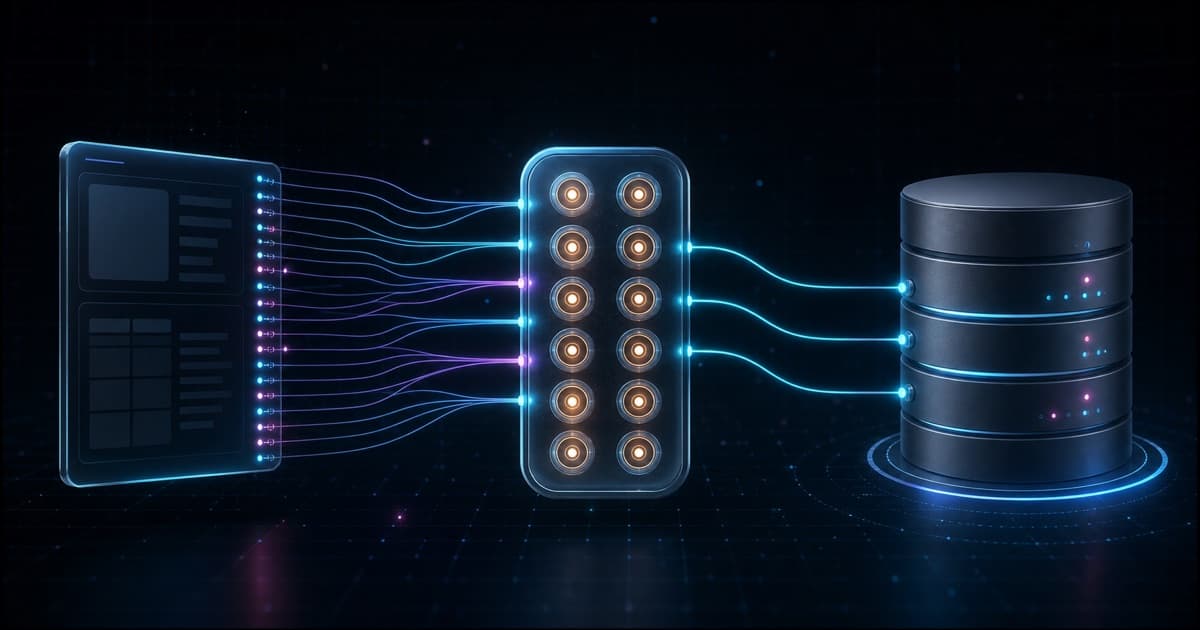
A connection pool is a small set of database connections that your backend opens once and keeps alive, so it can lend one to each query and take it back a few milliseconds later. It exists because opening a fresh connection on every request is slow and wasteful. Instead of paying that cost thousands of times, the pool pays it a few times and reuses the same connections for the life of the process.
To make it concrete, this post uses one running example: iTOP, a SaaS for event management and ticket sales. People browse events, buy tickets, and organizers pull reports, all hitting the same PostgreSQL database.
Why is opening a connection on every request slow?
Opening a database connection is not free. It needs a TCP handshake, an authentication round trip, and memory allocated on both the client and the Postgres server. In practice that is around 20 to 50 ms before you run a single query.
If every request opened and closed its own connection, the cost dominates the real work:
Request 1  ->  open (50ms)  ->  query (5ms)  ->  close
Request 2  ->  open (50ms)  ->  query (5ms)  ->  close
Request 3  ->  open (50ms)  ->  query (5ms)  ->  close
That is 150 ms of setup for 15 ms of actual querying. Postgres also has a hard limit on concurrent connections (often around 100), and each idle connection still costs memory, so opening one per request does not scale.
How does the pool actually work?
Think of the pool as a parking lot with a fixed number of spots. When the backend starts, it opens a handful of connections and keeps them parked and ready. A query does not open a connection, it borrows one from the pool, uses it, and returns it:
Backend starts  ->  opens 10 connections, keeps them ready

Request 1  ->  borrow conn #1  ->  query (5ms)  ->  return #1
Request 2  ->  borrow conn #2  ->  query (5ms)  ->  return #2
Request 3  ->  borrow conn #1  ->  query (5ms)  ->  return #1   (reused)
No time is spent opening connections. The same ten connections serve thousands of requests. The key move is that returning a connection does not really close it, it just marks it free for the next query.
Where does the connection pool live?
The pool lives in the memory of your application process, not in the database.
It is a data structure your app holds in RAM: an array of open connection objects.
Each of those is a real TCP socket, already opened and authenticated, from your API process to the Postgres server, kept open so you can reuse it.
When your code calls pool.query(...), the pool hands back one of those already-open sockets, so you are not reconnecting, you are reusing a live connection.
  API container                          Postgres container
 ┌───────────────────────┐             ┌───────────────────────┐
 │ app process (RAM)      │  TCP        │ postgres server        │
 │  CONNECTION POOL       │  sockets    │  backend proc #1       │
 │  [ sock1 sock2 sock3 ] │◄──network──►│  backend proc #2       │
 │  open + authenticated  │             │  backend proc #3       │
 └───────────────────────┘             └───────────────────────┘
The pool holds the client end of each socket. Postgres holds the other end as one backend process per socket, which is why open connections also cost memory on the server. If the API and Postgres are separate containers or machines, every query still crosses the network, but the expensive connection setup was already paid once at startup, so you only pay one fast round trip per query.
When does a connection happen: at connect time or at query time?
A connection is created when your app connects to Postgres, not when it runs a query. Connecting is the expensive part: it opens a TCP socket, authenticates, and Postgres spawns one backend process dedicated to that session. That whole thing is one connection. A query does not open a new connection. It travels over a socket that is already open, runs inside that same backend process, and the socket stays open after the query finishes.
So the pool pre-pays for connecting. At startup it opens N full connections (N sockets, N Postgres backend processes) and keeps them open. From then on, a query just borrows one of those already-open sockets, sends the SQL, reads the result, and hands the socket back.
This clears up the most common confusion: connecting to the database and querying the database are not two separate connections.
The connection is the open session (socket plus backend process).
The query is work you send over that session.
Reads and writes use the same connection: a SELECT and an INSERT are just different SQL over the same open socket, so there is no "read connection" or "write connection", only a full duplex session that carries both.
While a query runs, that one connection is marked active and cannot be lent to anyone else.
A long write inside a transaction holds it longer than a quick read, which is why slow writes drain a pool faster than slow reads of the same duration.
Is it one connection per user, or per query?
This is the part most people get wrong. A connection is borrowed per query, not per user or per request. It is held only for the milliseconds the query runs, then released.
Walk through a single request in iTOP:
User clicks "Buy ticket"
  -> request reaches the backend
  -> code runs: db.insert(orders)...
  -> pool lends connection #3        (borrowed)
  -> Postgres commits the order
  -> pool takes connection #3 back   (released)
  -> backend responds with the confirmation
Connection #3 was busy for about 5 ms. In one second, that same connection can serve hundreds of different requests. There is no "connection per user", because the connection is tied to the query, and the query lasts milliseconds.
How many users share one connection? Over time, unlimited, but never at the same instant. Sharing is time based: connection #3 serves one user, then the next, then the next, each for a few milliseconds. At any single moment, one connection runs at most one query.
With three users hitting iTOP at the same instant:
0ms:  Ana buys a ticket     -> borrows conn #1
2ms:  Bruno lists events    -> borrows conn #2
3ms:  Carla pulls a report  -> borrows conn #3
5ms:  Ana done              -> returns #1 (free again)
6ms:  Bruno done            -> returns #2
8ms:  Carla done            -> returns #3
Three connections were busy at the same time for a few milliseconds. A pool of ten barely noticed.
What happens when the pool is full?
The pool has a maximum size, and that ceiling is a feature, not a bug. When every connection is busy, the next query waits in a queue until one is returned:
Requests 1-10  ->  each borrows a connection (pool full)
Request 11     ->  waits in the queue
conn #3 frees  ->  request 11 borrows #3
For fast queries this is invisible, since connections free up in milliseconds. The pool becomes a bottleneck only when many slow queries run at once. If ten heavy reports each take 200 ms, all ten connections stay locked and request eleven waits. The fix is usually to make the slow queries faster (indexes, less work per query), not to raise the pool size blindly. A pool that is too large just pushes the contention down to Postgres, which has its own connection limit.
How do you size the pool?
The classic PostgreSQL JDBC driver exposes the two knobs that every pool has, described in the PostgreSQL DataSource docs:
| Setting | What it controls |
|---|---|
| initialConnections | How many connections to open at startup |
| maxConnections | The hard ceiling; extra callers wait until one frees |
The Java example from that documentation is the same idea every language repeats:
Jdbc3PoolingDataSource source = new Jdbc3PoolingDataSource();
source.setServerName("localhost");
source.setDatabaseName("itop");
source.setMaxConnections(10);

Connection con = source.getConnection();
try {
    // use the connection
} finally {
    con.close(); // returns to the pool, does not really close
}
That con.close() in the finally block is the whole discipline of pooling: you always return the connection, even on error, so the pool never leaks.
Modern pools (HikariCP in Java, pg/node-postgres in Node, SQLAlchemy in Python) use the same two knobs, plus timeouts.
A rough starting point for pool size is connections = ((core_count * 2) + effective_spindles).
For most web apps, a small number like 10 to 20 per instance is plenty.
Remember to multiply by the number of running instances, since each one has its own pool, and the total must stay under the Postgres limit.
How do you read pool metrics like "2/100"?
Dashboards often show something like 2/100 connections.
That means 2 connections are currently open (held by your pool) and 98 slots are still free on the server.
Those 2 open connections are usually idle, parked by the pool, waiting for the next query.
It helps to track two numbers separately:
- Active (in use): connections currently running a query. This spikes with traffic.
- Idle (in pool): connections open but not running anything, ready to be borrowed instantly.
Seeing a low, stable number at rest is healthy. It means the pool is holding a few warm connections so the next request is instant. A number that climbs toward the ceiling and stays there is the warning sign: queries are slow, or connections are leaking because some code path forgot to return them.
How long does an idle connection stay alive?
First, a correction that trips a lot of people up: connections are not created per request.
The pool opens some at startup and creates more only when concurrency needs them, up to maxConnections.
After that it reuses and keeps them alive.
A request does not create a connection, it borrows one that already exists.
How long an idle connection lives depends on three pool settings:
| Setting | What it does | Typical default |
|---|---|---|
| min / minimumIdle | connections kept warm even when idle, never closed just for being idle | often = max, or 0 |
| idleTimeout | an idle connection above the minimum is closed after this | node-postgres 10s, HikariCP 10min |
| maxLifetime | any connection is retired and replaced after this total age, even if healthy | HikariCP 30min |
So an idle connection stays alive until it crosses the idle timeout (and the pool is above its minimum) or it hits the max lifetime. Connections inside the minimum stay warm for as long as the process runs.
Defaults vary a lot, so read your pool's docs.
node-postgres (pg.Pool) closes idle clients after 10 seconds by default, so at rest the pool can drop to zero and pay a reconnect on the next burst.
HikariCP keeps minimumIdle warm and only trims the extras after 10 minutes.
The old PostgreSQL JDBC PoolingDataSource from the linked docs had no idle timeout at all: it never shrinks, and connections stay open until the pool itself closes.
The maxLifetime knob exists so a connection does not outlive server side or network timeouts and go stale while still parked in the pool.
What about serverless and many instances?
Pooling assumes a long-lived process that keeps connections warm. Serverless functions break that assumption, because each instance may open its own pool and they can multiply past the Postgres limit fast. The standard answer is an external pooler between your app and Postgres: PgBouncer, or the built-in pooler that managed providers like Neon and Supabase expose.
The app connects to the pooler, the pooler keeps a small, shared set of real connections to Postgres, and hundreds of function instances share them.
  fn instance 1 ┐
  fn instance 2 ├─ many short conns ─►┌──────────────┐  small pool  ┌──────────┐
  fn instance 3 ┤                      │ PgBouncer /   │─────────────►│ Postgres │
  fn instance N ┘                      │ Neon pooler   │ (e.g. 20)    │  max 100 │
                                       └──────────────┘              └──────────┘
   thousands of ephemeral clients        multiplexes             stays under the limit
In transaction mode, the pooler assigns a real connection per transaction rather than per client, so thousands of short-lived functions share a handful of real connections. In that setup, use the pooled connection string for normal queries and the direct string only for things that need a dedicated session, like migrations.
Going deeper: how does PgBouncer work?
PgBouncer is a lightweight connection pooler that runs as a separate process between your app and Postgres. It is not a database, it is a thin proxy that speaks the Postgres wire protocol, so your app connects to it exactly like it connects to Postgres, just on a different host and port. It holds a small set of real Postgres connections and lets thousands of clients share them.
Why add it when your app already pools? Because an app-side pool only pools inside one process.
With autoscaling, serverless, or several containers, each instance has its own pool and the totals blow past max_connections.
PgBouncer pools across all of them, at one central point.
Managed platforms make this trivial: Railway, Render, Neon, Supabase, and AWS RDS all expose a PgBouncer or built-in pooler you can turn on, then you point the app at the pooler URL instead of the direct database URL.
What are the three pool modes?
| Mode | A real connection is held... | Sharing | Use when |
|---|---|---|---|
| session | for the whole client connection | low | you need full session features, few clients |
| transaction | only during each transaction | high | web apps, serverless, many short transactions |
| statement | only during each statement | highest | autocommit-only workloads, no multi-statement tx |
Transaction mode is the one that unlocks serverless. A real Postgres connection is assigned when a transaction starts and returned the moment it commits, so between transactions the client holds nothing. Thousands of idle clients map onto a handful of real connections.
What does transaction mode break?
Because a client does not keep the same real connection between transactions, anything that relies on session state can break:
- Prepared statements (classic driver-level ones). Newer PgBouncer (1.21+) supports them in transaction mode, but check your version and driver.
- Session-scoped
SETand session variables. LISTEN/NOTIFY.- Advisory locks meant to be held across transactions.
- Temporary tables that should outlive a transaction.
Practical rule: in transaction mode, disable driver-side prepared statements if you hit errors (for example statement_cache_size=0, or the driver's simple-query option), and keep session-scoped work inside a single transaction.
Which knobs matter?
| Setting | What it does |
|---|---|
| pool_mode | session, transaction, or statement |
| max_client_conn | how many clients can connect to PgBouncer (can be thousands) |
| default_pool_size | real Postgres connections per user and database pair |
| min_pool_size | keep this many real connections warm |
| reserve_pool_size | extra connections for short bursts |
The shape is: max_client_conn is huge (say 5000) and default_pool_size is small (say 20).
PgBouncer absorbs 5000 clients onto 20 real Postgres connections, and those 20 stay under the server limit.
Do you still need an app-side pool?
Yes, a small one. With PgBouncer in front, keep the app pool small (max 3 to 5), because PgBouncer is doing the heavy pooling now. The app pool just avoids churning sockets to PgBouncer itself. Send normal traffic to the PgBouncer URL, and keep the direct database URL for migrations and admin tasks that need a stable session.
For a deeper look at how PgBouncer multiplexes clients onto real connections and how Neon builds this in, see PgBouncer connection multiplexing, and how Neon does it.
TL;DR
- A connection pool opens a few database connections once and reuses them, instead of opening one per request.
- Opening a connection costs 20 to 50 ms (TCP, auth, memory), so reuse is a large, cheap win.
- A connection is borrowed per query, held for milliseconds, then returned. There is no connection per user.
- When the pool is full, extra queries wait in a queue. Fix slow queries before raising
maxConnections. - Size with
initialConnectionsandmaxConnections, keep the total under the Postgres limit, and always return the connection in afinally. - For serverless or many instances, put an external pooler (PgBouncer, Neon, Supabase) in front of Postgres.
Written by AI, reviewed by Thiago Marinho
July 29, 2026 · Brazil