Node.js AsyncLocalStorage: async context without prop drilling
Node.js AsyncLocalStorage carries request context across async code. Learn implementation, use cases, maintainability, and multi-tenancy patterns.
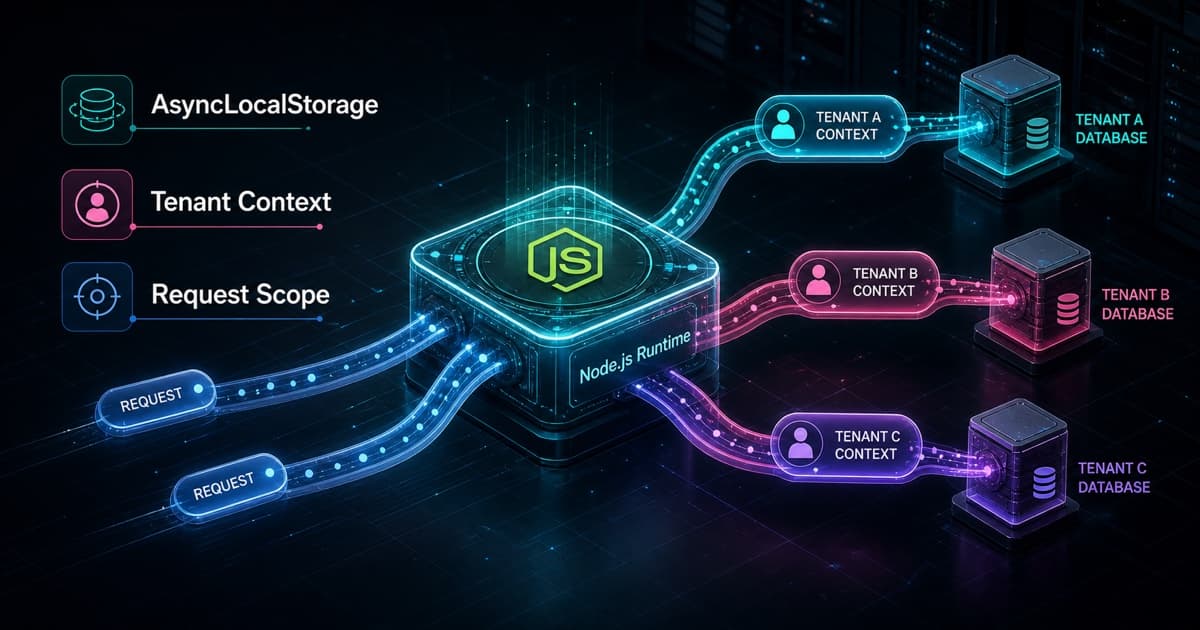
AsyncLocalStorage is the built-in Node.js API for carrying context through an asynchronous flow. It lets data like requestId, userId, tenantId, logger, traceId, or transactional client stay available during a request without passing the same object through every function.
The value is not hidden state. It is removing repeated plumbing that only exists to transport context. In multi-tenant systems, it helps select the database client, apply filters, and enrich logs consistently. Security still lives in the database, constraints, and authorization layer.
What is AsyncLocalStorage?
AsyncLocalStorage solves a common problem in Node.js servers: how to keep current request data available after several awaits without passing that data through every parameter. The Node.js docs describe the class as a way to create stores that stay coherent through asynchronous operations.
In practice, you create a context box at the start of the request and read that box in any function called inside that flow. If two requests run at the same time, each one keeps seeing its own requestId, tenantId, and logger, even when operations interleave in the event loop.
import { AsyncLocalStorage } from "node:async_hooks";

type RequestContext = {
  requestId: string;
  userId?: string;
  tenantId?: string;
};

const requestContext = new AsyncLocalStorage<RequestContext>();

export function runWithRequestContext<T>(
  context: RequestContext,
  callback: () => T,
): T {
  return requestContext.run(context, callback);
}

export function getRequestContext(): RequestContext {
  const context = requestContext.getStore();

  if (!context) {
    throw new Error("Request context is not available");
  }

  return context;
}
The core idea is this: run opens the scope, getStore reads the current context. Outside that scope, getStore returns undefined, so a small helper with an explicit error is usually better than spreading getStore() across the app.
The important detail is that this is not a global variable shared by everyone. The value is local to the async flow created by run.
await Promise.all([
  runWithRequestContext(
    { requestId: "req-a", tenantId: "tenant-a" },
    () => createInvoice(inputA),
  ),
  runWithRequestContext(
    { requestId: "req-b", tenantId: "tenant-b" },
    () => createInvoice(inputB),
  ),
]);
Inside createInvoice, getRequestContext() reads the right context for each execution. Request A does not see request B's context.
When did AsyncLocalStorage enter Node.js?
AsyncLocalStorage entered Node.js as part of async context tracking in node:async_hooks. The first public release entry was Node.js 13.10.0, in March 2020, with the change "introduce async-context API". The same API was also backported to Node.js 12.17.0 LTS as experimental.
The official history is useful:
| Version | What changed |
|---|---|
Node.js 13.10.0 | introduced the async context API in the Current line |
Node.js 12.17.0 | brought AsyncLocalStorage to LTS while still experimental |
Node.js 16.4.0 | marked part of AsyncLocalStorage as stable |
The original PR was nodejs/node#26540, opened by Vladimir de Turckheim. The motivation was already close to today's use: monitoring, logging, and reducing the need to pass the HTTP request object into deep layers only so a logger or observability tool can read context.
What existed before AsyncLocalStorage?
Before AsyncLocalStorage, request context already existed. It was just trapped at the edge of the app or carried by hand through many layers.
| Previous solution | How it worked | Real limit |
|---|---|---|
Pass req or context as a parameter | service(input, req) or service(input, ctx) | pollutes signatures that should not know about HTTP |
Use req.user, req.tenant, or res.locals | common in Express and MVC apps | works well in the route, but not in deep code detached from req |
| Request scope with dependency injection | common in NestJS and enterprise stacks | works, but adds framework ceremony |
Libraries like continuation-local-storage and cls-hooked | tried to keep async context before the native API | depended on older patterns and were more fragile |
| Global variables | currentTenant = ... | unsafe with concurrent requests |
In a simple Express route, there is nothing wrong with using what the route already has:
app.get("/tasks", async (req, res) => {
  const tenantId = req.user.tenantId;
  const tasks = await taskService.listTasks(tenantId);

  res.json(tasks);
});
That code is still clear. AsyncLocalStorage starts to shine when the chain grows:
route -> controller -> service -> domain service -> repository -> logger -> auditWithout async context, tenantId, requestId, userId, logger, and transaction pass through many functions that do not use those values. They only forward them. With AsyncLocalStorage, the route opens the context once, and only code that needs it reads it.
Middleware solves context at the boundary. AsyncLocalStorage solves context below the boundary, where the req object should not leak into every service, repository, logger, and database helper.
How do you implement AsyncLocalStorage on a server?
Implementation usually starts in the first request middleware. Resolve the basic data, build the context, and call the next handler inside run.
import { randomUUID } from "node:crypto";
import type { Request, Response, NextFunction } from "express";
import { runWithRequestContext } from "./request-context";

export function contextMiddleware(
  req: Request,
  _res: Response,
  next: NextFunction,
) {
  const requestId = req.header("x-request-id") ?? randomUUID();
  const userId = req.user?.id;
  const tenantId = req.header("x-tenant-id");

  return runWithRequestContext({ requestId, userId, tenantId }, next);
}
After that, internal services can read context without receiving req, user, tenant, or logger in every method.
import { getRequestContext } from "./request-context";

export async function createInvoice(input: CreateInvoiceInput) {
  const { tenantId, userId, requestId } = getRequestContext();

  logger.info({ requestId, tenantId, userId }, "creating invoice");

  return invoiceRepository.create({
    tenantId,
    createdBy: userId,
    ...input,
  });
}
In NestJS, the idea is the same. The docs show AsyncLocalStorage registered as a provider and populated in middleware before controllers and services run. In Express, the pattern also often starts in middleware, but the framework is not the key point. The key point is opening the context before calling the code that needs to inherit that scope.
In Next.js, the fit is different. middleware.ts, or Proxy in the newer docs, is great for decisions before the route: initial authentication, redirects, rewrites, reading cookies, headers, and pathname. It should not be treated as a wrapper that automatically carries deep context through the whole app.
A more precise App Router flow is: middleware validates or normalizes the request, passes minimal data through a header when needed, and the Route Handler, Server Action, or server-side function opens the custom context.
import { randomUUID } from "node:crypto";
import { headers } from "next/headers";

export async function GET() {
  const requestId = (await headers()).get("x-request-id") ?? randomUUID();

  return runWithRequestContext({ requestId }, async () => {
    const tasks = await listTasks();

    return Response.json(tasks);
  });
}
Use framework APIs when they already solve the problem. Use your own AsyncLocalStorage for context Next.js does not model: resolved tenant, current organization, user role, request logger, audit actor, custom trace data, or transactional client.
Who uses AsyncLocalStorage and how?
Frameworks use AsyncLocalStorage to turn request context into simple APIs. The developer calls a function that looks global, but the value belongs to the current async flow.
| Who uses it | Common use |
|---|---|
| Web frameworks | request context, headers, cookies, lifecycle helpers |
| Observability | requestId, traceId, spanId, log correlation |
| ORMs and data layers | current transaction, current client, connection scope |
| SaaS applications | tenantId, plan, permissions, tenant database |
| Internal libraries | contextual logger, feature flags, audit data |
The classic example is logging. Without async context, every function needs to receive requestId. With AsyncLocalStorage, the logger can enrich the message with the current request.
import { getRequestContext } from "./request-context";

export function logInfo(message: string, data: Record<string, unknown> = {}) {
  const context = getRequestContext();

  logger.info(
    {
      requestId: context.requestId,
      tenantId: context.tenantId,
      ...data,
    },
    message,
  );
}
What do Next.js and Prisma show in practice?
Request infrastructure is the best mental model for AsyncLocalStorage. Next.js and Prisma show where it belongs: not as hidden business logic, but as infrastructure that lets the current request be read by code below the route.
Next.js uses this model for request-time APIs. headers() and cookies() let you read request data in the App Router without passing req through every component or function. The after() docs also show request context for integrations, and Node's own blog says Next.js uses AsyncLocalStorage for request context tracking.
Prisma shows another concrete use: SQL comments. The @prisma/sqlcommenter-query-tags package adds tags to queries inside an async context using AsyncLocalStorage. That lets a query include metadata like requestId, route, or trace without passing those values to every Prisma call.
The pattern is the same in both cases: request context moves into internal layers without becoming a parameter in every signature. In your own code, that fits current tenant, logger, audit data, and transactional client. But the rule stays explicit where it matters: authorization validates permission, and the database protects isolation.
Prisma transactions deserve a separate note. The official API still passes the transactional client explicitly:
await prisma.$transaction(async (tx) => {
  await tx.account.update({ where: { id }, data });
  await tx.auditLog.create({ data: auditData });
});
Storing the current tx in AsyncLocalStorage is an application architecture pattern, not Prisma's main API style. It can clean up repositories, but it needs strong convention so code does not accidentally call the global prisma client when it meant to use tx.
What are the main use cases?
Async context is useful when the data belongs to the whole flow, but not to each domain function.
| Use case | What goes in context |
|---|---|
| Logging | requestId, tenantId, userId |
| Tracing | traceId, spanId, baggage |
| Audit | current actor, request source, normalized IP |
| Authorization | authenticated user, loaded roles, current tenant for validation |
| Transactions | current transactional client |
| Multi-tenancy | resolved tenant, current database or schema |
| Feature flags | environment, plan, cohort, tenant |
Use it when passing the same argument through five layers adds no clarity. Do not use it to hide a business dependency that belongs in the function signature. If priceCalculator(product, customer) needs the customer to calculate price, the customer should be a parameter. If a function only needs requestId for logging, context is better.
That is the real tradeoff: AsyncLocalStorage reduces prop drilling, but creates an implicit dependency. The function signature does not show that it reads tenantId, logger, or transaction from context. That is acceptable for request infrastructure. For business rules, prefer explicit parameters.
Why does AsyncLocalStorage make code more elegant and maintainable?
Maintainability improves because business code stops carrying parameters that are not part of the rule. The function gets smaller, the signature gets more honest, and the request entry point owns context creation.
Without context, the app tends to spread this:
await serviceA(input, { requestId, tenantId, userId, logger });
await serviceB(result, { requestId, tenantId, userId, logger });
await serviceC(result, { requestId, tenantId, userId, logger });
With context, the request is still explicit at the start, but transport no longer pollutes the inner layers.
return runWithRequestContext(context, async () => {
  const invoice = await createInvoice(input);
  await publishInvoiceCreated(invoice.id);
  return invoice;
});
The real benefit appears when the system changes. If tomorrow you add traceId, plan, region, or actorType, you do not need to change dozens of signatures that only forwarded the object. You change the context, the helpers, and the consumers that actually use that data.
The care point is to treat AsyncLocalStorage as infrastructure, not as a global business variable. Create small typed helpers with clear errors. Test critical functions by passing domain dependencies as parameters. For tests that depend on operational context, create a wrapper like withTestContext. Context should reduce noise, not hide rules.
How is AsyncLocalStorage used in multi-tenancy?
Multi-tenancy is where AsyncLocalStorage becomes especially useful, because almost every operation needs to know "which tenant is running". That value can come from a subdomain, custom domain, internal header, token, session, or route.
A common flow:
- The request enters through
acme.app.com. - Middleware extracts
acmeas the tenant identifier. - The app queries a landlord database that maps tenants to configuration.
- The system creates or reuses the database client for that tenant.
- The middleware opens
AsyncLocalStoragewithtenantId,tenantSlug,db, andrequestId. - Services and repositories read the current context.
type TenantContext = {
  requestId: string;
  tenantId: string;
  tenantSlug: string;
  db: TenantDatabase;
};

const tenantContext = new AsyncLocalStorage<TenantContext>();

export function getTenantContext(): TenantContext {
  const context = tenantContext.getStore();

  if (!context) {
    throw new Error("Tenant context is not available");
  }

  return context;
}

export async function tenantMiddleware(req: Request, res: Response, next: NextFunction) {
  const tenantSlug = resolveTenantSlug(req);
  const tenant = await landlordDb.tenant.findUnique({
    where: { slug: tenantSlug },
  });

  if (!tenant) {
    return res.status(404).send("Tenant not found");
  }

  const db = getTenantDatabase(tenant.databaseUrl);

  return tenantContext.run(
    {
      requestId: req.header("x-request-id") ?? randomUUID(),
      tenantId: tenant.id,
      tenantSlug: tenant.slug,
      db,
    },
    next,
  );
}
With that, the repository does not need to receive tenantId in every method when the database is already specific to that tenant.
export async function listTasks() {
  const { db } = getTenantContext();

  return db.task.findMany();
}
If the model uses a shared database, the repository should still filter by tenantId, and the database should enforce the rule where possible.
export async function listTasks() {
  const { db, tenantId } = getTenantContext();

  return db.task.findMany({
    where: { tenantId },
  });
}
This is the most important distinction: AsyncLocalStorage carries context, but it does not isolate data by itself. In a database-per-tenant architecture, it helps select the right client. In a shared-database architecture, it helps apply tenantId consistently. The guarantee comes from constraints, permissions, Row-Level Security where available, isolation tests, and query review.
Which multi-tenancy models fit AsyncLocalStorage?
Tenancy model means how each customer's data is stored. Microsoft frames this well: the tenancy model affects design, management, cost, and isolation.
| Model | How AsyncLocalStorage helps | Main care point |
|---|---|---|
| Database per tenant | stores tenantId and current database client | connection pools, provisioning, migrations |
| Schema per tenant | stores tenantId and current schema | search path control and migrations |
| Shared database | stores tenantId used in queries | leaks from queries without filters |
| Multi-tenant shards | stores tenant and resolved shard | routing and rebalancing |
For small or medium SaaS products with strong isolation needs, database per tenant is easy to reason about and works well with AsyncLocalStorage. For large scale with many small customers, a shared database often lowers cost, but it needs more discipline: every query must be tenant-aware.
What precautions avoid problems?
AsyncLocalStorage is stable in Node.js, but it still needs disciplined use.
- Prefer
runat the start of the request. AvoidenterWithas the default because it changes the current context more broadly. - Do not treat context as the authorization source. It carries the user and tenant, but policy must validate permissions.
- Do not put huge objects in the store. Keep IDs, small metadata, and required clients.
- Do not put secrets in context, because logs and errors may expose the store.
- Throw a clear error when
getStore()is empty. It reveals calls outside the correct scope. - Watch old callback libraries or custom thenables. If context disappears, Node's docs recommend finding the operation where
getStore()becomesundefinedand, in rare cases, usingAsyncResource. - In tests, create helpers that run code inside a fake context.
A test helper keeps the contract clear:
export function withTestContext<T>(callback: () => T) {
  return runWithRequestContext(
    {
      requestId: "test-request",
      userId: "test-user",
      tenantId: "test-tenant",
    },
    callback,
  );
}
When should you not use AsyncLocalStorage?
Implicit context has a cognitive cost. Use it with intent.
Do not use AsyncLocalStorage when:
- the data is an essential business input;
- the function should stay pure and easy to run outside a request;
- the code runs in the browser;
- the operation crosses worker threads or processes without explicit propagation;
- the team does not yet have helpers, tests, and conventions for context.
Good usage makes code clearer. Bad usage turns real dependencies into invisible state.
TL;DR
AsyncLocalStorage is a small tool with a large impact in Node.js backends. It carries request context through async code and reduces repeated parameters in logging, tracing, audit, transactions, and multi-tenancy.
In multi-tenant systems, it helps carry tenantId, current database, and request metadata without polluting every service. But it is not a security boundary. The boundary still lives in authorization, data model, constraints, Row-Level Security where applicable, and tests that prove tenant isolation.
Use AsyncLocalStorage to transport context. Use the database and access policy to protect data.
References
- Node.js: Asynchronous context tracking
- Node.js: Node.js 13.10.0 release notes
- Node.js: Node.js 12.17.0 release notes
- Node.js: Node.js 16.4.0 release notes
- Node.js PR #26540: async-hooks: introduce async-storage API
- Node.js: Mitigating Denial-of-Service Vulnerability from Unrecoverable Stack Space Exhaustion for React, Next.js, and APM Users
- Next.js: headers
- Next.js: cookies
- Next.js: after
- Next.js: Proxy
- Next.js: Authentication
- Prisma ORM: SQL comments
- Prisma ORM: Transactions and batch queries
- NestJS: Async Local Storage
- Ross Robino: Async Local Storage
- Felipe Valencia: Multi-Tenancy with Node.js AsyncLocalStorage
- Microsoft Learn: Multitenant SaaS database tenancy patterns
Written by AI, reviewed by Thiago Marinho
June 30, 2026 · Brazil