How I added browser-native TTS to the blog
Browser TTS tutorial for Next.js blog posts: research Web Speech API, plan the player, implement voices, speed control, tests, ship notes, and next steps.
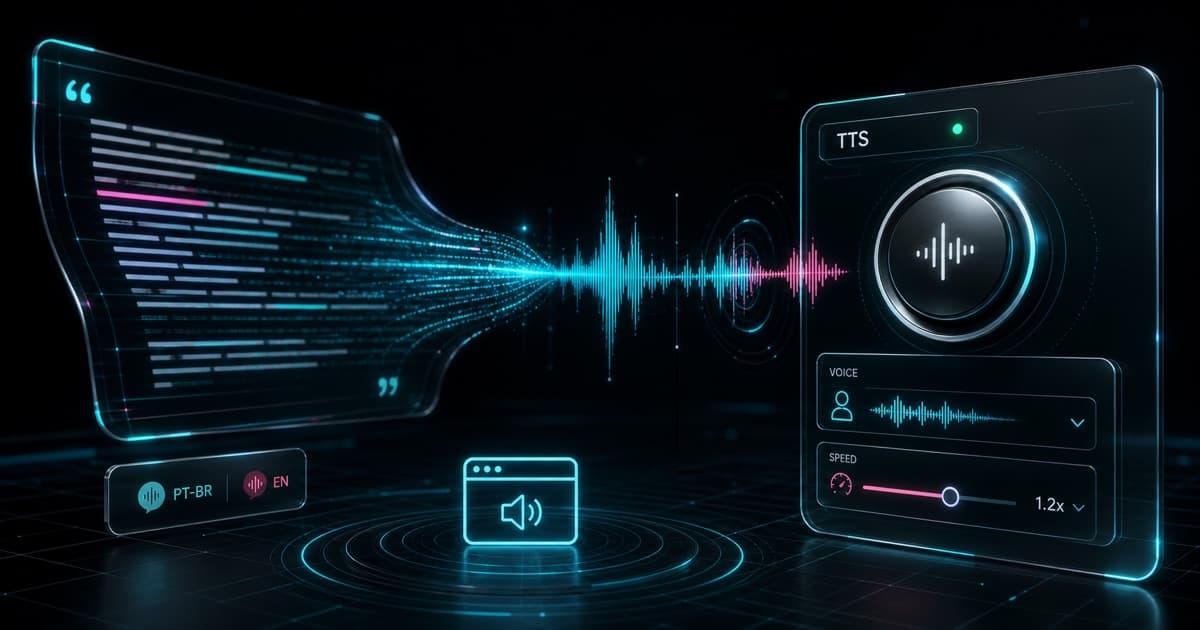
Text-to-speech (TTS) in the browser is a simple way to turn a post into audio without generating MP3 files, paying for an external API, or sending the content to another service. In this tutorial, I show how I added a listening player to this blog with Next.js, React, and the Web Speech API.
The result is a client-side component that reads the article title, description, and body in pt-BR or English. It lets the reader choose a browser voice, control speed up to 2.0x, pause, resume, stop, and follow chunk-level progress.
Research: what does the browser give us?
The first decision was to avoid an external service. The requirement was clear: use the browser itself. The relevant API is the Web Speech API, which has two parts: speech recognition and speech synthesis. For this feature, I only needed synthesis.
In practice, three pieces matter:
| API | Role in the player |
|---|---|
window.speechSynthesis | Controls the speech queue, voices, pause, resume, cancel, and speak |
SpeechSynthesisUtterance | Represents text the browser should speak |
SpeechSynthesisVoice | Represents a voice available in the device or browser |
The most important research finding: speechSynthesis.speak() works with a queue of SpeechSynthesisUtterance objects. That sounds small, but it shapes the design. A long post should not become one huge utterance. It is more reliable to split the text into chunks, speak one chunk, wait for onend, and then speak the next one.
I also checked two of my learning projects:
english-study, where TTS can reduce dependency on large audio files.fluent-stories, where I already had voice selection, voice ranking, andlocalStoragepersistence.
Those references led to two practical choices: load voices asynchronously because Chrome can expose them late, and rank voices with names like Natural, Neural, Google, Online, Samantha, Alex, Daniel, and Luciana before generic voices.
Plan: what should the contract be?
I wanted to keep the blog post page as a Server Component. The player needs browser APIs, so it should be a small isolated client component in src/components/blog/post-audio-player.tsx.
The contract became this:
<PostAudioPlayer
  locale={postLocale}
  text={audioText}
  labels={translatedLabels}
  className="mb-12"
/>
The Server Component builds the text from data Velite already generates:
const audioText = [post.title, post.description, post.plainBody]
  .filter(Boolean)
  .join(". ");
This avoids scraping the rendered DOM. The audible content comes from the post data source, not from the page markup. It also avoids reading navigation, footer text, buttons, or anything that is not part of the article.
The plan had five requirements:
- Detect whether the browser supports
speechSynthesis. - Filter voices by post language:
pt-BRoren. - Split the text into chunks for long-form reading.
- Control play, pause, resume, stop, voice, and speed.
- Prevent old events from advancing playback after
cancel().
Implementation: how does text become audio?
The first step is to normalize the text and split it into chunks. The goal is not perfect sentence-level synchronization. The goal is stability.
function chunkSpeechText(text: string, maxLength = 1800) {
  const normalized = normalizeSpeechText(text);
  if (!normalized) return [];

  const sentences = normalized.match(/[^.!?]+[.!?]+["')\]]*|[^.!?]+$/g) ?? [
    normalized,
  ];
  const chunks: string[] = [];
  let current = "";

  for (const sentence of sentences) {
    const next = sentence.trim();
    if (!next) continue;

    if (`${current} ${next}`.trim().length > maxLength) {
      chunks.push(current.trim());
      current = next;
    } else {
      current = `${current} ${next}`.trim();
    }
  }

  if (current) chunks.push(current.trim());
  return chunks;
}
The player does not speak the whole post at once. It calls speakChunk(0), and each chunk calls the next one from onend.
function speakChunk(index: number) {
  if (!isSupported) return;

  const chunk = chunksRef.current[index];
  if (!chunk) {
    shouldContinueRef.current = false;
    chunkIndexRef.current = 0;
    setCurrentChunk(0);
    setPlaybackState("idle");
    return;
  }

  const utterance = new SpeechSynthesisUtterance(chunk);
  const speechRun = speechRunRef.current;
  utterance.lang = getSpeechLang(locale);
  utterance.rate = rateRef.current;
  utterance.voice =
    window.speechSynthesis
      .getVoices()
      .find((voice) => voice.voiceURI === selectedVoiceURIRef.current) ??
    null;

  chunkIndexRef.current = index;
  setCurrentChunk(index + 1);
  setPlaybackState("playing");

  utterance.onend = () => {
    if (!shouldContinueRef.current || speechRun !== speechRunRef.current) {
      return;
    }
    speakChunk(index + 1);
  };

  utterance.onerror = () => {
    if (speechRun !== speechRunRef.current) return;
    shouldContinueRef.current = false;
    setPlaybackState("idle");
  };

  window.speechSynthesis.speak(utterance);
}
This code is more defensive than it first looks, but every part exists because of how the Web Speech API behaves in real browsers.
| Piece | Why it exists |
|---|---|
chunksRef | Avoids stale closures when browser callbacks run later |
chunkIndexRef | Stores the current chunk so speed changes can restart it |
rateRef | Makes the next utterance use the latest speed |
selectedVoiceURIRef | Makes the next utterance use the latest voice |
shouldContinueRef | Stops auto-advance after stop or cancel |
speechRunRef | Ignores late onend and onerror events from an old run |
The key detail is speechRunRef. Some browsers still fire events after speechSynthesis.cancel(). Without this counter, a canceled utterance could call speakChunk(index + 1) and corrupt the queue.
Implementation: how are voices selected?
The voice list comes from speechSynthesis.getVoices(), but it may be empty on the first render. The player listens for voiceschanged and also retries after a short timeout.
const loadVoices = () => {
  const nextVoices = window.speechSynthesis.getVoices();
  const nextAvailableVoices = getSupportedVoices(locale, nextVoices);

  setVoices(nextVoices);

  if (selectedVoiceURIRef.current || nextAvailableVoices.length === 0) {
    return;
  }

  const savedVoiceURI = getStoredVoiceURI();
  if (
    savedVoiceURI &&
    nextAvailableVoices.some((voice) => voice.voiceURI === savedVoiceURI)
  ) {
    setSelectedVoiceURI(savedVoiceURI);
    return;
  }

  const preferredVoice =
    nextAvailableVoices.find((voice) => voice.lang === getSpeechLang(locale)) ??
    nextAvailableVoices[0];

  setSelectedVoiceURI(preferredVoice.voiceURI);
};
Filtering starts with the language:
- Portuguese posts use voices that start with
pt; - English posts use voices that start with
en; - if the browser has no voice for that language, the player falls back to the rest.
Then a simple score puts more natural voices first:
if (name.includes("natural") || name.includes("neural")) score += 100;
if (name.includes("premium")) score += 90;
if (name.includes("google")) score += 80;
if (name.includes("online")) score += 70;
This does not guarantee perfect quality, but it improves the default choice without adding an external dependency.
Implementation: why does speed restart the chunk?
Speed (utterance.rate) is applied when the utterance starts. If the reader changes the slider while the browser is already speaking, the current speech does not reliably change speed.
The fix is to restart the current chunk:
const handleRateChange = (nextRate: number) => {
  setRate(nextRate);
  rateRef.current = nextRate;

  if (!isSupported || playbackState !== "playing") return;

  const currentIndex = chunkIndexRef.current;
  shouldContinueRef.current = false;
  speechRunRef.current += 1;
  window.speechSynthesis.cancel();
  shouldContinueRef.current = true;
  speakChunk(currentIndex);
};
The slider goes from 0.7x to 2.0x, with 1.2x as the default. That default felt better for technical posts: fast enough to keep flow, but still clear.
Tests: how did I validate it?
I did not run a full production build because this repo avoids bun run build unless it is needed. The validation focused on what changed.
Commands:
bun install
bun velite
bun lint
bunx tsc --noEmit
bun dev
I also checked real blog routes:
curl -I http://localhost:3000/blog/sindrome-do-impostor-na-tecnologia
curl -I http://localhost:3000/en/blog/imposter-syndrome-in-tech
Manual testing found two important fixes:
| Problem | Fix |
|---|---|
next-intl tried to interpolate {current} and {total} too early | Passed the placeholders explicitly to the component |
| Changing speed did not affect current speech | Restarted the current chunk with the new rate |
Lint passed with existing warnings in scripts/validate-i18n-seo.mjs. TypeScript passed without errors.
Collaboration: what was the human role, and what was the AI role?
This feature was not only code generation. It came from a short conversation with good constraints, local references, and product QA. That matters because coding agents execute better when the technical intent and the product intent show up early.
How did AI capture the intent?
You defined two things that changed the architecture:
- "I want a button to listen to the content in pt-BR or English."
- "In this case, use the browser's own resources."
The first sentence defined the experience. The second removed wrong paths: no external API, no MP3 file, no new backend, no audio storage. The natural solution became the Web Speech API.
What in the codebase made it easier?
The codebase already had good extension points:
| Existing base | How it helped |
|---|---|
language on posts | Defines whether speech uses pt-BR or en |
plainBody generated by Velite | Lets the player read the post without scraping the DOM |
| Centralized post page | Gave the feature a clear integration point |
next-intl | Made player labels bilingual |
| Server Components by default | Kept the browser-only part isolated in a client component |
| Established visual language | Let the player inherit the dark, glass, cyan/magenta look |
The most important piece was plainBody. Without it, I would have had two worse options: scrape text from rendered HTML or create another extraction pipeline. Since Velite already gave the clean post body, the player received exactly the content it should read.
What was the software engineer's role?
The human role was decisive in three moments.
First, you set the right constraint: use the browser. That simplified the solution and avoided cost, latency, API keys, and operational complexity.
Second, you brought product memory. By pointing to english-study and fluent-stories, you connected the feature to past work. That pulled in better decisions, such as voice selection, async voice loading, and localStorage persistence.
Third, you did real usage QA. You noticed that changing speed did not affect the current speech, asked for speed up to 2.0x, set 1.2x as the default, and chose the image that communicated the product best. That is software engineering with product judgment.
What was the AI role?
AI did the execution work: it read the codebase, found the integration point, created the component, wired i18n, validated with local commands, created the follow-up issue, and turned the feature into documentation and a blog post.
But the relevant part was not "AI wrote code". It was the combination:
| Human | AI |
|---|---|
| Defines intent and constraints | Explores the codebase and proposes the path |
| Brings local references | Reuses patterns and avoids reinvention |
| Tests usage feel | Adjusts implementation and validates regression |
| Decides visual taste | Generates variants and applies the approved one |
| Points to next steps | Records the issue and documents the plan |
The result got better because AI did not try to invent a parallel product. It followed the existing architecture. And you did not treat the agent as autocomplete. You treated it as an executor with context, feedback, and direction.
Ship: what landed?
The final ship had five parts:
src/components/blog/post-audio-player.tsx, the client-side player.- Integration in
src/app/[locale]/blog/[slug]/page.tsx. - Strings in
messages/pt-BR.jsonandmessages/en.json. - A visual note in
docs/redesign-2026-agentic-futurist.md. - A follow-up issue: TTS highlighting and auto-scroll.
The result is a small interface improvement with a good architectural property: the blog stays static, bilingual, and Markdown-first. Audio is generated in the reader's browser, only when they ask for it.
Next steps: what comes after this?
The next step is not replacing browser TTS with a more advanced API. It is making the reading experience easier to follow while audio is playing.
Roadmap:
- Highlight the current chunk inside the article.
- Smoothly auto-scroll with the active chunk.
- Add word-level highlighting through
SpeechSynthesisUtterance.onboundaryas progressive enhancement.
I would not make word-level highlighting the main requirement. The onboundary event varies by browser and voice. The reliable path is chunk-level highlighting first, then word-level highlighting only when the browser gives that data cleanly.
TL;DR
- I used the Web Speech API for browser-native TTS.
- The post becomes chunks, not one huge utterance.
- The player filters voices by language and saves the choice in
localStorage. - Speed goes up to
2.0x, with1.2xas the default. - Changing speed during playback restarts the current chunk.
- The next step is active chunk highlighting and auto-scroll.
Written by AI, reviewed by Thiago Marinho
June 20, 2026 · Brazil