useEffect vs useLayoutEffect: when to use them and when to delete the Effect
useEffect vs useLayoutEffect in React: learn when to sync external systems, measure layout before paint, and delete needless Effects safely.
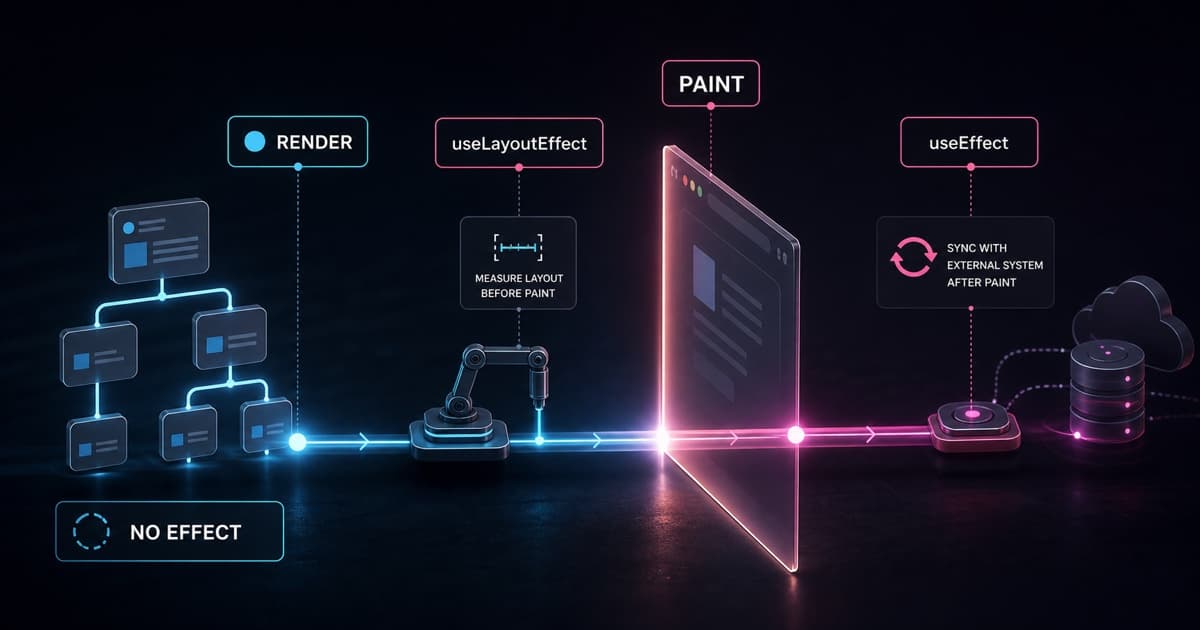
useEffect synchronizes a React component with something outside React. useLayoutEffect is the version that runs before the browser paints, useful when you must measure or adjust layout without showing a wrong frame. If the logic only calculates data for rendering or responds to a click, you probably do not need any Effect.
That is the practical rule behind the most important React docs pages on this topic: useEffect, useLayoutEffect, Synchronizing with Effects, Lifecycle of Reactive Effects, Separating Events from Effects, Reusing Logic with Custom Hooks, and You Might Not Need an Effect. The common mistake is treating Effect as "the place to run code after render". That shortcut creates extra renders, duplicated state, unstable dependencies, and hydration bugs.
What is the decision rule?
Before writing an Effect, answer one question: does this logic synchronize the component with an external system?
| Case | Choice |
|---|---|
| Calculate a value from props or state | Calculate during render |
| Run logic caused by a click, submit, or input | Put it in the event handler |
| Reset all state when an identifier changes | Use key |
| Connect to WebSocket, browser API, timer, or external library | Use useEffect |
| Measure DOM before the browser paints | Use useLayoutEffect |
External system means something React does not control: network, timer, imperative DOM, storage, analytics, WebSocket, map library, video player, third-party widget. If there is no external system, the Effect is usually hiding poor state modeling.
When should you use useEffect?
Use useEffect when the component must stay synchronized with something outside the React tree while it is on screen.
Good examples:
- Connect and disconnect from a WebSocket.
- Subscribe and unsubscribe from a
windowlistener. - Send an analytics event when a screen appears.
- Control an imperative library that is not React.
- Update
document.title.
import { useEffect } from "react";

function ChatRoom({ roomId }: { roomId: string }) {
  useEffect(() => {
    const connection = createConnection(roomId);
    connection.connect();

    return () => {
      connection.disconnect();
    };
  }, [roomId]);

  return <ChatMessages roomId={roomId} />;
}
Here the Effect has a clear reason: the connection exists outside React. The cleanup function is part of the contract. In Strict Mode, React may run setup and cleanup one extra time in development to test whether they mirror each other correctly.
useEffect only runs on the client. It does not run during server rendering. In Next.js, this matters: if the data can be loaded on the server, in a Server Component, loader, or action, that path is usually better than fetching everything in an Effect after hydration.
How should you think about an Effect lifecycle?
Do not think of an Effect as part of the component lifecycle. A component mounts, updates, and unmounts. An Effect has a different model: start synchronizing and stop synchronizing.
useEffect(() => {
  const connection = createConnection(roomId);
  connection.connect();

  return () => {
    connection.disconnect();
  };
}, [roomId]);
When roomId changes, React is not "updating the Effect". It is stopping an old synchronization and starting a new one. This reading makes dependencies more honest: if the Effect uses roomId, the synchronization depends on roomId.
Cleanup is not an optional detail when you subscribe, connect, schedule, or observe something. It is half of the Effect. If setup starts a synchronization, cleanup must stop that same synchronization.
When should you use useLayoutEffect?
Use useLayoutEffect when the final render depends on a real DOM measurement and the user must not see the intermediate position.
The classic case is a tooltip:
- Render the tooltip.
- Measure its height with
getBoundingClientRect(). - Render it again above or below the target.
- Only then let the browser paint.
import { useLayoutEffect, useRef, useState } from "react";

function Tooltip() {
  const ref = useRef<HTMLDivElement | null>(null);
  const [height, setHeight] = useState(0);

  useLayoutEffect(() => {
    const rect = ref.current?.getBoundingClientRect();
    setHeight(rect?.height ?? 0);
  }, []);

  return <div ref={ref}>Tooltip height: {height}</div>;
}
useLayoutEffect blocks paint. That avoids flicker, but it also delays the screen. This is why it should be rare. If useEffect works without a visual jump, use useEffect. If there is a visible jump caused by layout measurement or visual adjustment, useLayoutEffect makes sense.
There is also a server rendering consequence: there is no layout on the server. A component that depends on useLayoutEffect to decide what to render cannot produce the final correct HTML on the server. In those cases, prefer useEffect, make that part client-only, or render the component only after hydration.
Why might you not need an Effect?
Many Effects appear because a component stores derived state. This makes React render once with an old value, run the Effect, call setState, and render again.
Avoid this:
function Invoice({ items }: { items: Item[] }) {
  const [total, setTotal] = useState(0);

  useEffect(() => {
    setTotal(items.reduce((sum, item) => sum + item.price, 0));
  }, [items]);

  return <strong>{total}</strong>;
}
Prefer calculating during render:
function Invoice({ items }: { items: Item[] }) {
  const total = items.reduce((sum, item) => sum + item.price, 0);

  return <strong>{total}</strong>;
}
Derived state is state that can be calculated from props or other state. Do not store it in useState only to synchronize it later with useEffect. Calculate it directly. If the calculation is truly expensive, use useMemo after measuring in production, not by habit.
const visibleItems = useMemo(() => {
  return filterItems(items, query);
}, [items, query]);
useMemo does not make the first render faster. It only skips repeated work on later renders when dependencies have not changed.
How do you separate an Effect from an event handler?
Ask where the logic came from, from the user's point of view.
If it happens because the user saw the screen, it can be an Effect:
useEffect(() => {
  post("/analytics/event", { name: "visit_checkout" });
}, []);
If it happens because the user clicked a button, submitted a form, or selected an item, put it in the handler:
function handleSubmit(event: FormEvent) {
  event.preventDefault();
  post("/api/orders", { cartId });
}
Event handler knows the action that happened. An Effect often loses that context and tries to rebuild intent by watching state after the fact. That is more fragile and harder to debug.
This separation is the baseline, not the whole architecture. As a frontend grows, you need stronger mechanisms to keep logic readable: custom hooks to encapsulate synchronization, query libraries for data cache and concurrency, external stores when many parts of the screen share state, schema validation for complex forms, and sometimes state machines for flows with many transitions. The rule still matters because it removes the first layer of noise: before choosing a larger tool, you need to know whether the logic belongs to render, an event, or external synchronization.
When should you extract a custom Hook?
When an Effect is legitimate and starts carrying state, cleanup, refs, and dependency rules, extract a custom Hook. This does not make an Effect unnecessary by itself. It makes the boundary explicit and reusable.
Before:
function ChatRoom({ roomId }: { roomId: string }) {
  useEffect(() => {
    const connection = createConnection(roomId);
    connection.connect();

    return () => {
      connection.disconnect();
    };
  }, [roomId]);

  return <ChatMessages roomId={roomId} />;
}
After:
function useChatConnection(roomId: string) {
  useEffect(() => {
    const connection = createConnection(roomId);
    connection.connect();

    return () => {
      connection.disconnect();
    };
  }, [roomId]);
}

function ChatRoom({ roomId }: { roomId: string }) {
  useChatConnection(roomId);

  return <ChatMessages roomId={roomId} />;
}
The component says what it wants again: keep a chat connection for that room. The hook hides how to synchronize. This pattern is useful for WebSocket, matchMedia, IntersectionObserver, storage, video players, and imperative library integrations.
How do you reset state without useEffect?
When all state in a screen should reset after an identifier changes, use key.
Avoid this:
function ProfilePage({ userId }: { userId: string }) {
  const [comment, setComment] = useState("");

  useEffect(() => {
    setComment("");
  }, [userId]);

  return <textarea value={comment} onChange={(e) => setComment(e.target.value)} />;
}
Prefer splitting the component and changing the key:
function ProfilePage({ userId }: { userId: string }) {
  return <Profile key={userId} userId={userId} />;
}

function Profile({ userId }: { userId: string }) {
  const [comment, setComment] = useState("");

  return <textarea value={comment} onChange={(e) => setComment(e.target.value)} />;
}
key tells React that this profile is a different conceptual instance. When userId changes, React recreates the component and clears its internal state. You avoid rendering with the old value and avoid an Effect whose only job is deleting state after the fact.
What checklist should you use before writing an Effect?
Use this short checklist:
- Is there an external system? If not, try render,
key, event handler, oruseMemo. - Was the logic caused by a specific interaction? Put it in the handler.
- Are you copying props into state? It is probably derived state.
- Are you resetting everything when an ID changes? Use
key. - Do you need to measure layout before paint? Use
useLayoutEffect. - Does the Effect have symmetrical cleanup? If it connects, disconnect. If it subscribes, unsubscribe.
- Are dependencies stable and complete? If not, rethink the structure.
- Is the Effect legitimate but repeated or verbose? Extract a custom Hook.
The point is not to fear Effects. The point is to use them for what they do well: synchronize boundaries.
TL;DR
- useEffect synchronizes the component with external systems after commit.
- useLayoutEffect runs before paint and should stay limited to visual measurement or adjustment that cannot flicker.
- If the logic calculates data for rendering, calculate during render.
- If the logic responds to a user action, put it in the event handler.
- If all state must reset when an ID changes, use
key. - If the Effect syncs something real and gets verbose, extract a custom Hook.
- Needless Effects cost extra renders, fragile dependencies, and hydration bugs.
The best Effect makes a boundary explicit: React on one side, the external world on the other. If everything is inside React, start by deleting the Effect.
Written by AI, reviewed by Thiago Marinho
August 1, 2026 · Brazil